En Revit puedes alinear textos con otros textos. Pero no puedes colocarlos con precisión en relación a nada mas. Aquí te dejo un link donde muestra una excelente solución a este problema.
WIIP-REVIT TIP CENTER TEXT ON A POINT
Thursday, October 12, 2017

FINALLY FOUND A WAY TO SNAP TEXT IN REVIT
Text in Revit can align with other text entities. But you can't snap it to geometry. Below is the link to a blog where I found an acceptable solution.
WIIP-REVIT TIP CENTER TEXT ON A POINT
WIIP-REVIT TIP CENTER TEXT ON A POINT
Sunday, August 20, 2017
IMAGEN DE FONDO E ILUMINACION EN REVIT CLOUD RENDER
¿Quebrándote la cabeza en porqué tu imagen de fondo y/o parámetros de iluminación no funcionan en cloud render de Revit? Bueno a mi me pasó y me tardé un buen rato en encontrar la solución. Resulta que para efectos de "Cloud Render" no debes especificar los parámetros en "Graphic Display Options", debes hacerlo en el dialogo de "RENDER".

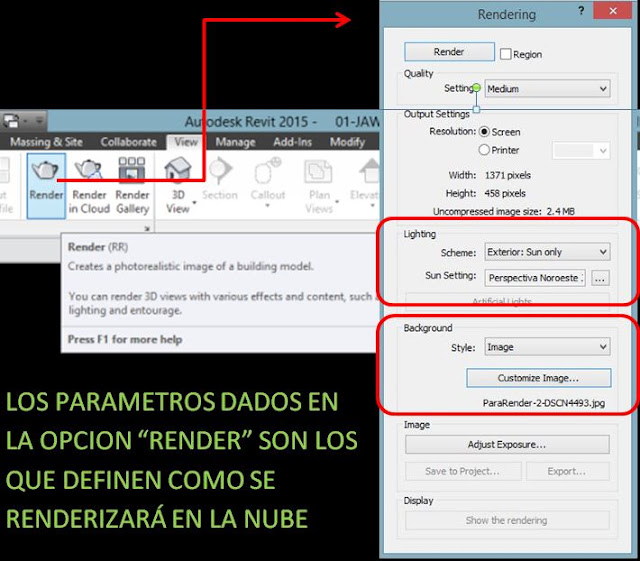

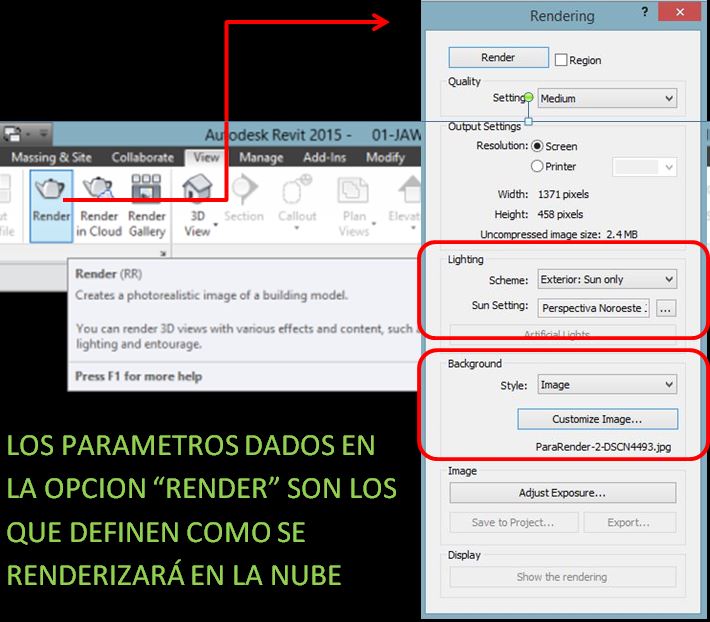
REVIT CLOUD RENDER BACKGROUND IMAGE AND LIGHT SETTINGS
Still trying to figure out why your background image and/or light settings don't display correctly in your cloud rendering? Well I was stuck in this situation and took me a while to figure it out. It happens if you are specifying the parameters in Revit's "Graphic Display Options"--that's wrong. You have to specify your render parameters in Revit's "RENDER" dialogue.


Monday, April 17, 2017
CONVIERTE TUS ESCALAS HUMANAS DE AUTOCAD A REVIT
 |
| Vamos a convertir esta escala humana de Autocad en una familia de Revit |
PASO 1.
Crea una nueva familia usando la plantilla Detail Item (Elemento de Detalle).

Sunday, April 16, 2017
BRING YOUR AUTOCAD HUMAN FIGURES INTO REVIT
|
| Let´s turn this Autocad human figure block into a Revit family |
STEP 1.
Create a new family using the Detail Item template
Wednesday, March 15, 2017
FREE BEGINNER LEVEL REVIT TRAINING VIDEOS AT AUTODESK DESIGN ACADEMY
The Autodesk site is quite complex, a true labrynth comprised of thousands of pages. Browsing around the site, I found these free beginner level Revit training videos at Autodesk Design Academy.

https://academy.autodesk.com/software/revit
GRATIS VIDEOS DE REVIT NIVEL PRINCIPIANTE EN AUTODESK DESIGN ACADEMY
El sitio de Autodesk es bastante complejo, un verdadero laberinto compuesto por miles de páginas. Navegando entre el sitio encontré estos videos gratis de Revit a nivel principiante en la Autodesk Design Academy.

https://academy.autodesk.com/software/revit
Friday, March 3, 2017
COMO EXCLUIR MUROS CORTINA (CANCELERÍA) DE LAS TABLAS DE CUANTIFICACION PARA MUROS EN REVIT
En Revit los muros cortina (cancelería, ventanales, etc) entran dentro de la categoría MUROS, lo cual resulta inconveniente, al menos para mi. Al extraer tablas de cuantificación necesito diferenciar los muros cortina de los muros regulares. Al final en la construcción ambos trabajos los ejecutan proveedores radicalmente distintos. Bueno a continuación una de varias soluciones posibles:
HOW TO EXCLUDE CURTIAIN WALLS FROM REVIT WALL SCHEDULES
Revit makes curtain walls fall into the WALLS category, which is pretty inconvenient most of the times, at least for me. When it comes to scheduling I always need to differentiate curtain walls from regular walls, in the end the on-site works are performed by radically different contractors. Here´s one of many possible solutions:
Tuesday, February 28, 2017
COMO ROTAR PATRONES DE SUPERFICIE IRREGULARES EN REVIT
A veces sucede que un patrón de superficie irregular en modo "Realista" no queda correctamente alineado.
Si el patrón es irregular o si el patrón en modo "Linea oculta" es tipo "Drafting", no será posible rotarlo. La solución es
 |
| PATRÓN EN MODO REALISTA = MAL ALINEADO |
Saturday, February 4, 2017
ASIGNAR COLOR A MASAS EN REVIT
A veces conviene asignar colores a las masas porque son transparentes y las formas pueden ser confusas.

PROCEDIMIENTO
1.-Selecciona una de las masas y usa "Edit in Place":

PROCEDIMIENTO
1.-Selecciona una de las masas y usa "Edit in Place":
ASSIGN COLORS TO REVIT MASSES
When doing a massing study you sometimes need to assign different colors to masses because they are transparent and forms are easily confused.
STEPS.
1.-Select one of the masses and Edit in Place:
STEPS.
1.-Select one of the masses and Edit in Place:
Monday, January 9, 2017
ROTATE IRREGULAR SURFACE PATTERNS IN REVIT
If your surface pattern is irregular, it may happen that its "Realistic" pattern is not aligned as it should.
If the hidden line pattern is irregular, or if it is a drafting pattern it is not possible to rotate it. The solution is
 |
| REALISTIC PATTERN IS NOT WELL ALIGNED |
Subscribe to:
Comments (Atom)